
Aurevion Phone Cleaner
FULL FAST FABULOUS CO., LIMITEDTools
3.928.00 Reviews
- Version
- 6.0
- Installs
- 50.00K
- Age Rating
- Everyone
Screenshots
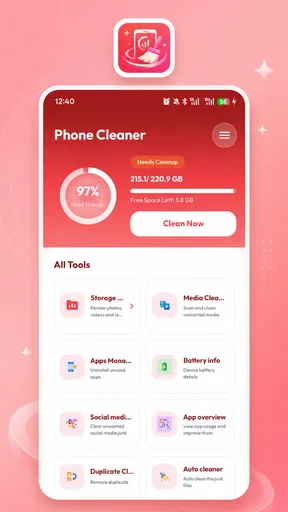
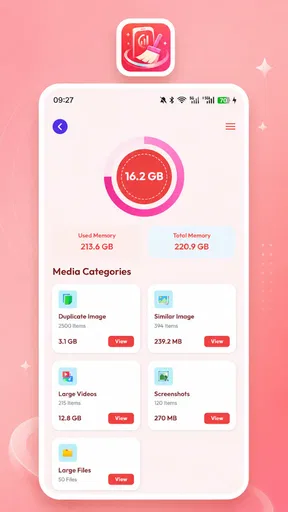
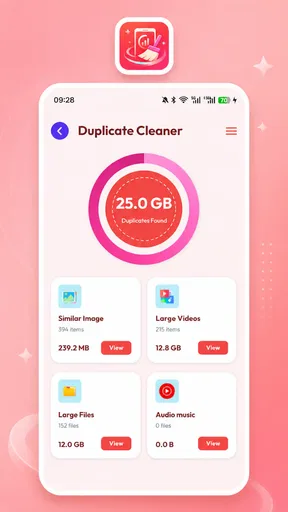
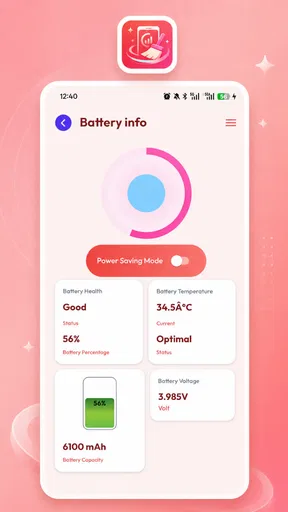
Our Review of Aurevion Phone Cleaner
 Analysis by Appyee
When a phone is used by several people in a household, storage problems become surprisingly easy to create. One person saves videos, another installs a few games, and someone else keeps downloading documents for school or work. Before long, the device feels crowded, yet nobody is quite sure what can be removed safely. I tested Aurevion Phone Cleaner with that shared-device situation in mind, and I found that its value is less about dramatic “one tap” promises and more about giving the owner a clearer place to inspect apps and files.
This is a free tools app from FULL FAST FABULOUS CO., LIMITED. It is aimed at reviewing storage use, managing installed apps, and bringing some order to files on an Android device. The app has an average rating of 3.9 from around 265 ratings, with over 50K installs, so it has attracted a modest but real user base rather than appearing as an entirely unknown utility. It is suitable for Everyone, runs on Android 8.0 or later, and its current version is 6.0.
How Aurevion Phone Cleaner fits a shared household phone
The most useful way to approach this app is as a review screen for decisions, not as an automatic judge of what matters. On a family tablet, an older spare phone, or a device passed between adults and children, storage is often mixed together. A large folder may contain a child’s downloaded lessons, a parent’s work documents, and duplicate images from a messaging conversation. Removing items without checking can create more trouble than it solves.
I like that the basic purpose points toward inspection and organization. Instead of treating every large file as disposable, I would use the app to identify where the pressure is coming from, then discuss the result with the people who use the device. That small change in workflow matters. The person who owns the phone can make the final choice, while other household members can explain which files or apps they still need.
A realistic example is a shared Android phone used during travel. One person downloads maps and shows, another takes photographs, and a child installs a game for the journey. When the phone begins warning about low space, Aurevion Phone Cleaner can help bring the different categories into view. I would open the storage tools, look for unusually large apps or file groups, and then check the actual content before deleting anything. The app becomes a conversation starter and an inventory, rather than a substitute for judgment.
The safest benefit is visibility before action. That is especially important on a shared device, where a file that looks unimportant to one person may be essential to somebody else. I would not hand the phone to a child and ask them to clean it independently. I would use the review process with them, explaining what belongs to whom and why some items should remain.
Starting with clear boundaries
Setup is straightforward in concept, but the important preparation happens outside the app. Before using any cleaner, I recommend agreeing on who owns the phone, who is allowed to remove applications, and where important files should be kept. Aurevion Phone Cleaner can help organize what is present, but it does not replace a household agreement about responsibility.
On a personal phone, I can make quick decisions. On a shared one, I would first ask each regular user to identify their essential apps and folders. This is particularly useful when a device has separate work, school, and entertainment uses. The list does not need to be formal. A short note saying “keep the banking app, school documents, and current photo folder” is enough to prevent an impulsive cleanup.
I would also review the app list before touching files. Removing an unused game may be harmless, but removing a utility used for two-factor sign-in or a child’s learning activity can cause immediate frustration. The app’s role in managing apps is helpful here because it puts installed software into the cleanup discussion. Still, the final decision should come from the device owner, not from a visual suggestion alone.
Another practical boundary is timing. I would not run a cleanup while someone is preparing for a trip, submitting homework, or finishing work on the phone. A quiet moment makes it easier to inspect names, dates, and contents. This sounds obvious, but shared devices often get cleaned precisely when they are urgently needed, which is when mistakes are most likely.
Coordinating apps and files without stepping on accounts
Aurevion Phone Cleaner is best suited to coordination at the device level. It can help the owner see what is installed and what kinds of files are taking up room, but that is different from managing each person’s account. I would keep those boundaries separate. One person may be signed into a cloud service, messaging account, or school platform, and deleting a local copy does not necessarily mean the underlying account is unaffected—or that the file can be recovered easily.
For a household, I would use a simple three-step routine. First, inspect storage and identify the largest or most obviously redundant items. Second, ask the relevant user whether the item is still needed. Third, remove only what has a clear replacement or backup. This approach is slower than pressing a single cleaning button, but it is much better for a device with mixed ownership.
Start with apps that nobody recognizes or uses, rather than personal folders.
Check downloads and duplicate-looking media manually, because similar filenames can hide different versions.
After each small batch of changes, let the regular users confirm that their important tools still work.
The non-obvious advantage of this routine is that it reveals habits. If the same person repeatedly fills the phone with temporary downloads, the household can change that behavior instead of repeating the same cleanup every month. If the problem comes from one unusually large app, uninstalling random small apps will not make a meaningful difference. A storage review helps direct effort toward the real cause.
I would be cautious with shared photo folders. A cleaner can make a crowded gallery look like an obvious target, but family photos often have emotional value that is not visible from the file size. Before removing anything, I would create a separate copy through the household’s normal backup method. Aurevion Phone Cleaner can support the inspection stage, but I would not treat it as the family archive.
Age, trust, and the limits of a cleaning tool
The Everyone age classification makes the app broadly approachable, but that should not be confused with giving every household member equal authority over the phone. A younger user may understand how to open a storage screen without understanding the consequences of deleting an offline document or uninstalling an app used by somebody else.
For children, I would use the app as a teaching aid. We could sort the phone’s contents into “needed now,” “keep somewhere else,” and “safe to remove,” with an adult making the final tap. That turns a vague storage warning into a practical lesson about digital ownership. It also avoids making the child responsible for decisions that affect other people’s accounts and files.
For teenagers, the conversation can be more collaborative. They may be perfectly capable of identifying old downloads and unused apps, but I would still ask them to explain what an item is before removing it. This is especially useful when filenames are unclear or when several people use the same messaging and media folders. Trust works better when the process is visible rather than secretive.
Adults also need boundaries. A partner or housemate should not assume that access to the phone means permission to inspect personal files. A storage tool can show that space is being used, but household convenience does not automatically justify browsing private content. I would keep the cleanup focused on agreed areas and let each person handle their own sensitive material whenever possible.
This is where Aurevion Phone Cleaner should not be mistaken for a family-management system. Its practical role is device organization. It does not turn a shared phone into separate private spaces, and it should not be used as a way to monitor another person’s activity. If the real need is account separation, child supervision, or privacy controls, the phone’s built-in user and account features are a better place to start.
What the app does well in everyday use
The strongest part of the experience is the way it encourages a pause before cleanup. Storage management is often frustrating because Android settings can feel scattered across apps, downloads, galleries, and system menus. A dedicated tools app gives the task a more focused destination. For someone who wants to understand why a phone is full, that focus is useful.
App management is also practical for devices that have changed hands. An older phone may contain remnants from a previous owner: games, shopping apps, social tools, and utilities that no longer fit the current user. Reviewing those installations can make the device easier for a new household member to understand. I would still check whether an app is required by the system or by another person before removing it, but the review itself is a good first step.
File organization matters just as much as deletion. A crowded download area can make it difficult to find a current document, even when the phone technically has enough free space. I would use the app to locate old installers, repeated documents, and media that has already been moved elsewhere. The goal is not to make the storage screen look empty; it is to make the remaining content easier to navigate.
There is also a useful psychological effect. When people can see where storage is going, they are less likely to blame the newest app or the youngest user automatically. The household can make a decision based on the actual contents of the device. That is a small but meaningful improvement over guessing.
Where I would be careful
A cleaner app cannot know the personal importance of a file from its name or size. Large videos may be disposable, or they may be the only copy of a family event. An old app may be unused today but needed tomorrow. I therefore see Aurevion Phone Cleaner as a guide to inspection, not an authority that should be trusted without review.
There is also a trade-off between convenience and control. A specialized cleaner can make storage work feel simpler than searching through several Android menus, but adding another tool means learning its layout and deciding how much access to give it. People who already understand Android’s built-in storage settings may prefer the direct route, especially when they only need to remove one known file or uninstall one known app.
The app is less suitable for someone expecting a complete performance transformation. Freeing storage can make a phone easier to manage, but it does not automatically fix an aging battery, weak hardware, poor network service, or every slowdown. I would recommend it for organization and inspection, not as a universal solution to every phone problem.
I would also avoid turning cleanup into a routine that runs without thought. On a personal device, repeated review may be harmless, but on a shared phone it can create tension if files disappear unexpectedly. A monthly household check, with clear agreement about what will be reviewed, is more sensible than constant unsupervised deletion.
Who should use it, and who should choose another route
I think Aurevion Phone Cleaner is a good match for Android users who feel their storage is disorganized and want one focused place to review apps and files. It is particularly useful for a family tablet, a hand-me-down phone, or a device used by several adults with different habits. The free price also makes it easy to try without turning the cleanup task into a purchase decision.
It is a reasonable choice for someone who does not enjoy digging through Android settings. The app’s purpose is clear enough for a practical maintenance session: inspect what is present, decide what belongs, and organize the rest. Its current version, 6.0, works on devices running Android 8.0 or newer, which covers a broad range of still-used Android hardware.
I would choose the built-in Android storage tools instead when I already know exactly what needs to go. They are closer to the operating system and may be preferable for users who want the fewest moving parts. I would also look for a more specialized backup or file-management solution when the main problem is preserving family photos, synchronizing documents, or separating private accounts. Aurevion Phone Cleaner can help reveal the problem, but it is not a replacement for those dedicated jobs.
Users who are uncomfortable reviewing files themselves should be cautious. The app may make the list easier to inspect, but it cannot make personal decisions safely on their behalf. If a phone contains important work, school, or family material, the owner should remain involved from the first scan through the final deletion.
My household verdict
After using Aurevion Phone Cleaner as a storage and organization aid, I see it as a practical middle ground between scattered system menus and overly ambitious cleanup expectations. It is free, focused on tools, and useful when the real problem is not simply “too many files” but uncertainty about what is occupying the device.
For a shared household phone, I would recommend using it openly, with one person responsible for final changes and each regular user given a chance to identify important content. That workflow respects account boundaries and reduces the chance of deleting something valuable. The app works best when it supports coordination rather than replacing it.
My final advice is simple: use the review screens to find the source of clutter, start with clearly disposable items, and make a backup before touching personal media. If you want a calm way to inspect apps and files on an Android device, Aurevion Phone Cleaner is worth trying. If you need private account separation, supervision, or a dedicated backup system, keep those needs with the phone’s own controls or a more specialized tool.
Verdict
Strengths of Aurevion Phone Cleaner
- Quickly identifies large, duplicate, and unnecessary files.
- Simple interface makes storage cleanup easy for beginners.
- Can help free space without manually browsing every folder.
- Useful file categories make unwanted content easier to review.
- Lightweight design should have minimal impact on device performance.
Limitations of Aurevion Phone Cleaner
- Cleaning suggestions may require careful checking before deletion.
- Results can vary depending on Android version and storage permissions.
- Some features may be limited behind advertisements or premium access.
- It may not remove cached data from every installed application.
- Background scanning could use battery and temporarily slow older devices.
Similar Picks in This Category
View All
Google LLC4.0

Gboard - the Google Keyboard
Google LLC4.5

Google Play services
Google LLC4.3

Google Play Store
Google LLC4.9

Files by Google
Google LLC4.5

SHAREit: Transfer, Share Files
Smart Media4U Technology Pte.Ltd.4.3
Frequently Asked Questions
What is Aurevion Phone Cleaner and what does it do?
Aurevion Phone Cleaner is designed to help Android users identify and remove unnecessary files that may occupy valuable storage space. Its typical cleaning tools may include scans for cached data, temporary files, duplicate items, large files, and leftover app data. Before confirming a cleanup, review the results carefully because some files shown as removable may still be useful to you.
Is Aurevion Phone Cleaner safe to use on my phone?
Aurevion Phone Cleaner can be useful when handled carefully, but no cleaning application should be trusted blindly with every suggested deletion. Check the permissions requested during installation and avoid granting access that seems unrelated to its purpose. We also recommend reviewing selected files before cleaning and keeping backups of important photos, documents, downloads, and messaging attachments.
Can Aurevion Phone Cleaner really improve phone performance?
Aurevion Phone Cleaner may make a noticeable difference when your device is nearly full or overloaded with temporary data, especially by freeing storage and helping you locate large files. However, it cannot solve every performance problem. Slowdowns caused by an aging battery, outdated software, overheating, weak hardware, or demanding background apps may require different solutions.
Does Aurevion Phone Cleaner delete photos, videos, or personal files?
The application may identify large, duplicate, or apparently unnecessary media and files, but users should not assume that every recommendation is safe to remove. Personal photos, videos, documents, and downloads can be selected accidentally during a deep cleanup. Carefully inspect file names, locations, previews, and categories before confirming deletion, and save irreplaceable content elsewhere first.
Is Aurevion Phone Cleaner free, and does it contain advertisements or subscriptions?
The availability of free tools, advertisements, premium features, and subscription options can depend on the version downloaded and the platform’s current listing. Before using the cleaner extensively, check its store page and in-app purchase screen for pricing, trial terms, renewal conditions, and limitations. If a subscription is offered, confirm cancellation rules before starting any trial.
